
0801-pytest-timeout 问题

昨天群里有个同学问了一个问题,关于 Pytest 的 timeout 问题。
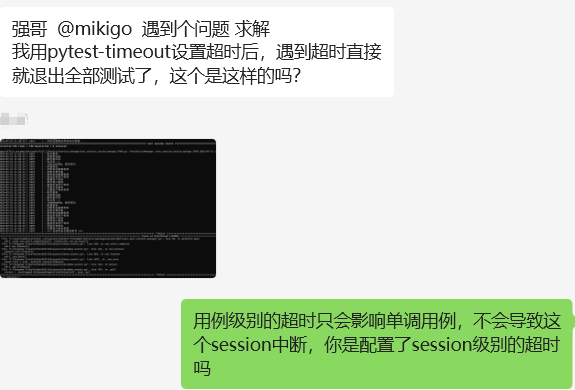
我用 pytest-timeout 很长时间了,之前没有遇到过这个问题。

而且我确定之前的行为是用例级别的超时只会影响单调用例。

这就魔幻了呀~~😂

然后仔细看了下这个同学发的报错截图,也不太确定就是 pytest-timeout 的问题。

经过一会儿的折腾,我拿到的对方的工程代码,安装上环境之后,运行 pytest 发现确实有这个问题。

卸载 pytest-timeout 之后,运行 pytest 没有问题,基本上可以确定是 pytest-timeout 的问题。

那么这个问题是怎么回事呢?

查看 pytest-timeout 的源码,发现在 pytest-timeout 会先判断有没有SIGALRM 这个属性,如果有,则使用 signal 方法,否则使用 thread 方法。

HAVE_SIGALRM = hasattr(signal, "SIGALRM")
if HAVE_SIGALRM:
    DEFAULT_METHOD = "signal"
else:
    DEFAULT_METHOD = "thread"

signal 模块中:

if sys.platform == "win32":
    SIGBREAK: Signals
    CTRL_C_EVENT: Signals
    CTRL_BREAK_EVENT: Signals
else:
    if sys.platform != "linux":
        SIGINFO: Signals
        SIGEMT: Signals
    SIGALRM: Signals

显然 Windows 下没有 SIGALRM 这个属性。

因此 Windows 下走的是 thread 的方法。

@pytest.hookimpl(trylast=True)
def pytest_timeout_set_timer(item, settings):
    """Setup up a timeout trigger and handler."""
    timeout_method = settings.method
    if (
        timeout_method == "signal"
        and threading.current_thread() is not threading.main_thread()
    ):
        timeout_method = "thread"

    if timeout_method == "signal":

        def handler(signum, frame):
            __tracebackhide__ = True
            timeout_sigalrm(item, settings)

        def cancel():
            signal.setitimer(signal.ITIMER_REAL, 0)
            signal.signal(signal.SIGALRM, signal.SIG_DFL)

        item.cancel_timeout = cancel
        signal.signal(signal.SIGALRM, handler)
        signal.setitimer(signal.ITIMER_REAL, settings.timeout)
    elif timeout_method == "thread":
        timer = threading.Timer(settings.timeout, timeout_timer, (item, settings))
        timer.name = "%s %s" % (__name__, item.nodeid)

        def cancel():
            timer.cancel()
            timer.join()

        item.cancel_timeout = cancel
        timer.start()
    return True

主要是通过 threading.Timer 来实现超时的。 而 threading.Timer 在超时之后会调用方法 timeout_timer

def timeout_timer(item, settings):
    """Dump stack of threads and call os._exit().

    This disables the capturemanager and dumps stdout and stderr.
    Then the stacks are dumped and os._exit(1) is called.
    """
    if not settings.disable_debugger_detection and is_debugging():
        return
    terminal = item.config.get_terminal_writer()
    try:
        capman = item.config.pluginmanager.getplugin("capturemanager")
        if capman:
            capman.suspend_global_capture(item)
            stdout, stderr = capman.read_global_capture()
        else:
            stdout, stderr = None, None
        terminal.sep("+", title="Timeout")
        caplog = item.config.pluginmanager.getplugin("_capturelog")
        if caplog and hasattr(item, "capturelog_handler"):
            log = item.capturelog_handler.stream.getvalue()
            if log:
                terminal.sep("~", title="Captured log")
                terminal.write(log)
        if stdout:
            terminal.sep("~", title="Captured stdout")
            terminal.write(stdout)
        if stderr:
            terminal.sep("~", title="Captured stderr")
            terminal.write(stderr)
        dump_stacks(terminal)
        terminal.sep("+", title="Timeout")
    except Exception:
        traceback.print_exc()
    finally:
        terminal.flush()
        sys.stdout.flush()
        sys.stderr.flush()
        os._exit(1)

你看,最后是调用了 os._exit(1),这会导致整个 Python 进程退出。

而我之前一直是在 Linux 上使用 pytest-timeout 的,Linux 上的实现是通过 signal 来实现的。

所以结论呼之欲出,Linux 下用例超时后,后续的用例仍然可以继续执行,而 Windows 下用例超时后,整个 Python 进程就退出了。

声明:本站所有文章,均为本站原创发布。任何个人或组织,在未征得本站同意时,禁止复制、盗用、采集、发布本站内容到任何网站、书籍等各类媒体平台。-- mikigo